No native renderer
Pure C# output with no Chromium, wkhtmltopdf, or runtime deployment surprises.
Free, MIT-licensed PDF generation for .NET
TerraPDF is a lightweight, zero-dependency PDF library for invoices, reports, tables, QR codes, barcodes, bookmarks, custom fonts, and encrypted documents.
New release
Faster text, tables, images, fonts, and QR codes, with 60–95% less memory allocated and no code changes needed. A one-page invoice renders at about 10,000 pages per second on two CPUs.
Write the document in a fluent API. TerraPDF lays it out, paginates it, and writes the file.
var brand = "#1A3C5E";
(string Item, string Sku, int Qty)[] lines =
[
    ("Wireless Mouse - Graphite",   "SKU-10231", 24),
    ("Mechanical Keyboard, 87-key", "SKU-10456", 12),
    ("USB-C Dock, Dual 4K",         "SKU-10877",  6),
    ("Laptop Stand, Aluminium",     "SKU-10920", 18),
];

Document.Create(doc =>
{
    doc.Page(page =>
    {
        page.Size(PageSize.A5);
        page.Margin(1.5, Unit.Centimetre);
        page.DefaultTextStyle(s => s.FontSize(10));

        page.Header().Column(col =>
        {
            col.Item().Row(row =>
            {
                row.RelativeItem().AlignMiddle()
                   .Text("TerraPDF Logistics").Bold().FontSize(13).FontColor(brand);
                row.AutoItem().AlignRight()
                   .Text("PACKING SLIP").Bold().FontSize(20).FontColor(brand);
            });
            col.Item().LineHorizontal(2, brand);
        });

        page.Content().PaddingTop(14).Column(col =>
        {
            col.Spacing(14);

            col.Item().Row(row =>
            {
                row.RelativeItem().Column(shipTo => { /* address block */ });
                row.AutoItem().QrCode("https://terrapdf.example/track/ORD-2026-1187", size: 88);
            });

            col.Item().Table(table =>
            {
                table.ColumnsDefinition(c =>
                {
                    c.RelativeColumn(5);
                    c.RelativeColumn(2);
                    c.RelativeColumn(1);
                });
                // brand header row + line items
            });

            col.Item().AlignCenter()
               .Barcode("ORD-2026-1187", height: 46, showCaption: true);
        });

        page.Footer().AlignCenter().Text(t =>
        {
            t.Span("Page ");
            t.CurrentPageNumber();
            t.Span(" of ");
            t.TotalPages();
        });
    });
})
.PublishPdf("packing-slip.pdf");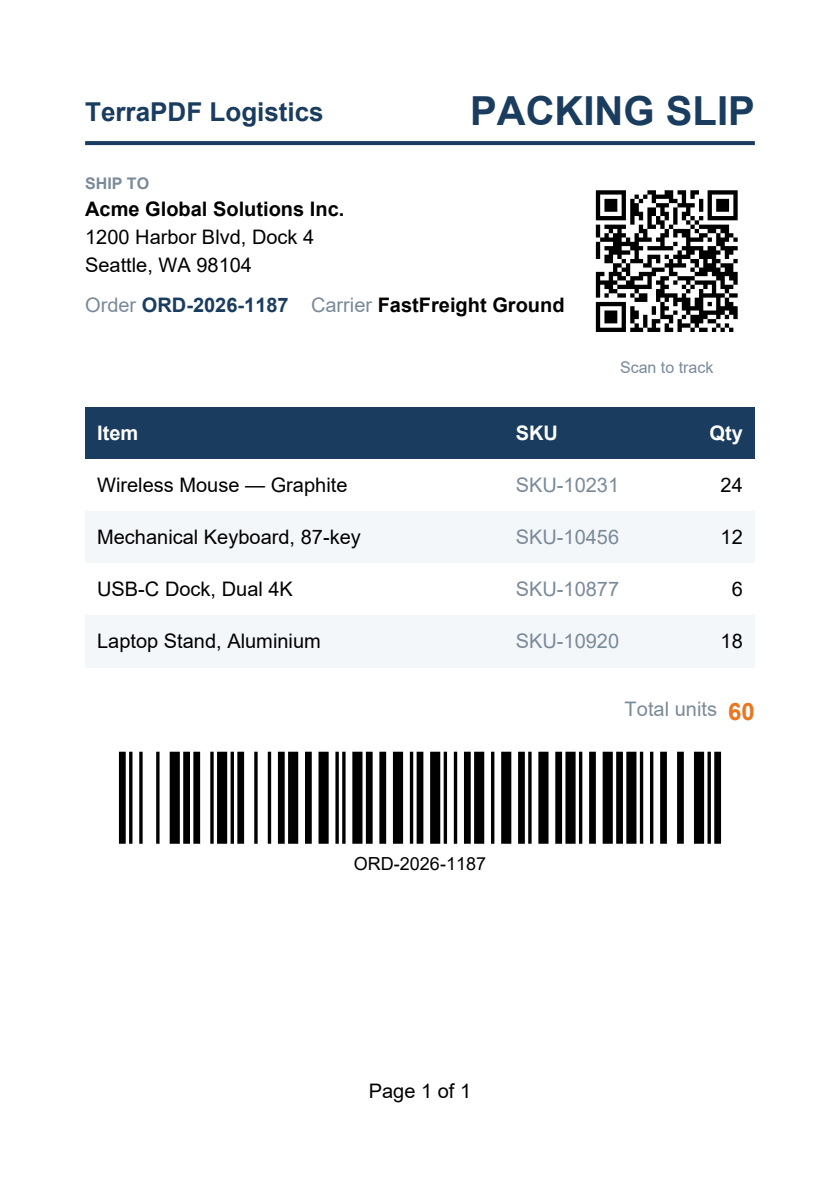
Pure C# output with no Chromium, wkhtmltopdf, or runtime deployment surprises.
Rows, columns, tables, spans, headers, footers, page numbers, and precise spacing.
Images, links, bookmarks, metadata, QR codes, barcodes, custom fonts, and AES-256 encryption.
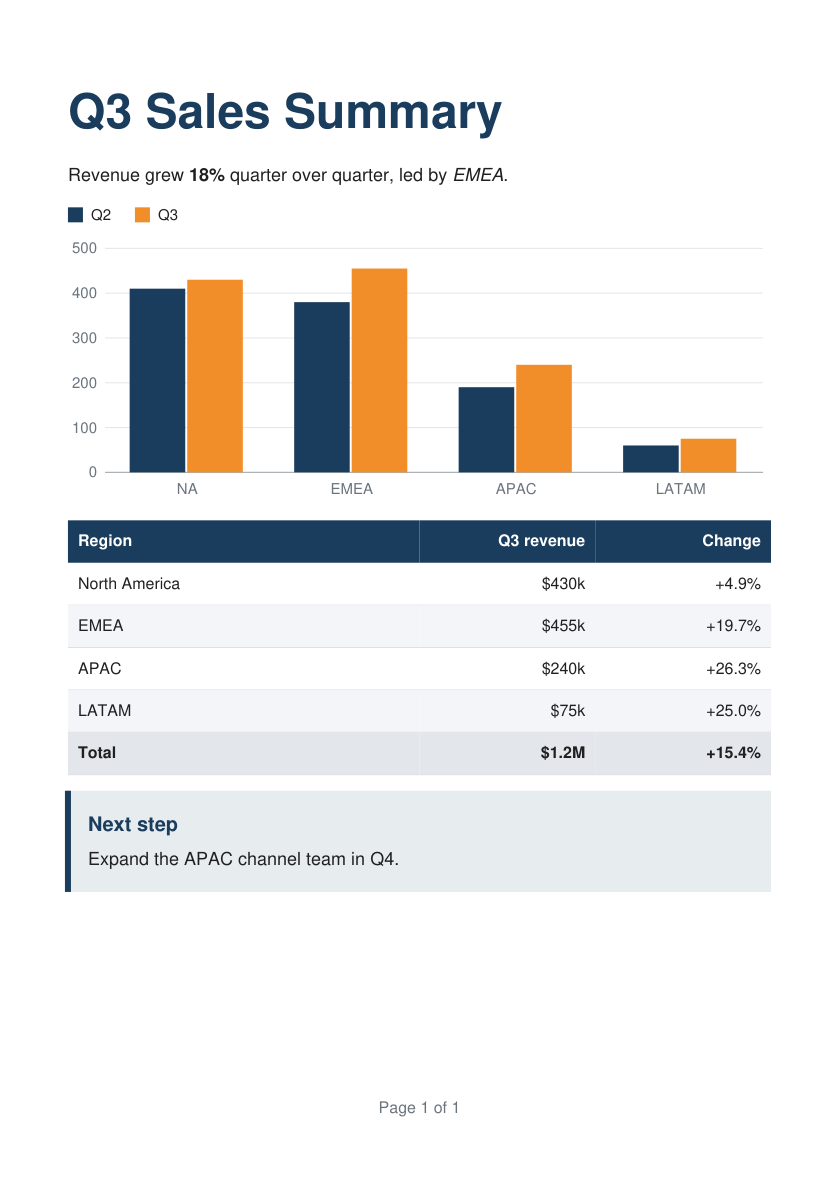
Ask for a document in plain language. The agent describes it as JSON and calls TerraPDF’s create_pdf tool, which validates it, renders it, and returns the file. Mistakes come back with exact JSON paths, so the agent fixes them itself.
{
  "title": "Q3 Sales Summary",
  "page": { "size": "A5", "margin": 34 },
  "theme": { "accentColor": "#1A3C5E", "fontSize": 9 },
  "content": [
    { "type": "heading", "level": 1, "text": "Q3 Sales Summary" },
    { "type": "paragraph",
      "text": "Revenue grew **18%** quarter over quarter, led by *EMEA*." },
    { "type": "chart", "chartType": "bar", "height": 150,
      "labels": ["NA", "EMEA", "APAC", "LATAM"],
      "series": [
        { "name": "Q2", "values": [410, 380, 190, 60] },
        { "name": "Q3", "values": [430, 455, 240, 75] } ] },
    { "type": "table",
      "columns": [
        { "header": "Region", "width": 2 },
        { "header": "Q3 revenue", "align": "right" },
        { "header": "Change", "align": "right" } ],
      "rows": [
        ["North America", "$430k", "+4.9%"],
        ["EMEA", "$455k", "+19.7%"],
        ["APAC", "$240k", "+26.3%"],
        ["LATAM", "$75k", "+25.0%"] ],
      "footerRows": [["Total", "$1.2M", "+15.4%"]] },
    { "type": "callout", "title": "Next step",
      "text": "Expand the APAC channel team in Q4." }
  ]
}
The TerraPDF skill gives Copilot, Cursor, and Claude Code the verified API and compiling recipes. Add the skill
TerraPDF.Agents adds create_pdf to Agent Framework, Semantic Kernel, and any IChatClient. Wire it up
dnx TerraPDF.Mcp brings the same tools to Copilot, Cursor, Claude, and LangChain. Connect it
Start with the guide, then adapt one of the samples for your app.